Drive Weather With Live Radar
Concept Elements IncWeather
4.5681.00 Reviews
- Version
- 12.8.2
- Installs
- 100.00K
- Age Rating
- Everyone
Screenshots
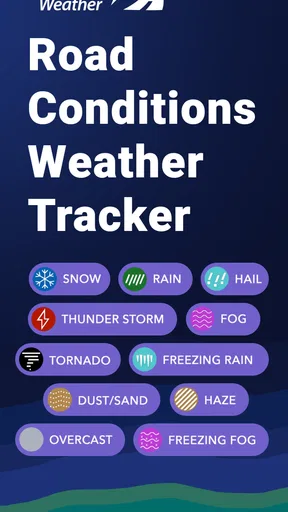
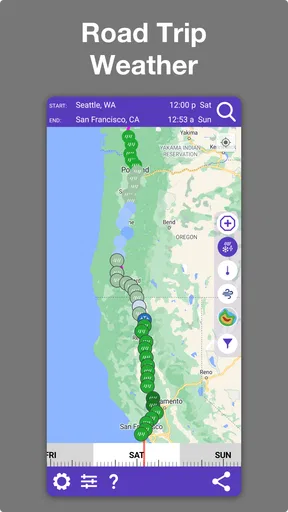
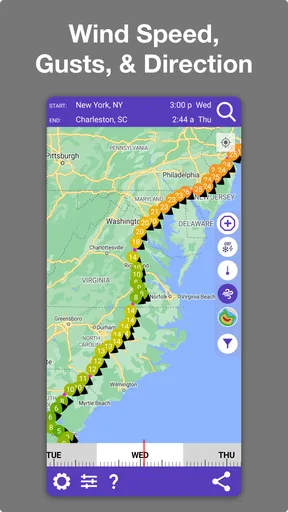
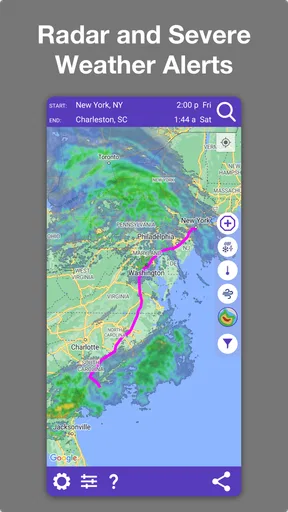
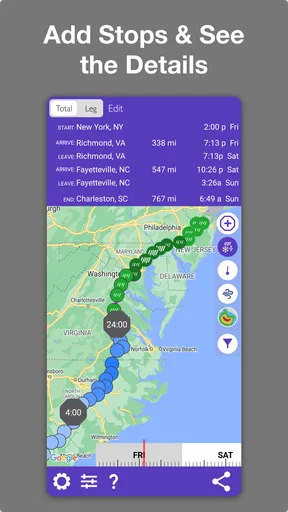
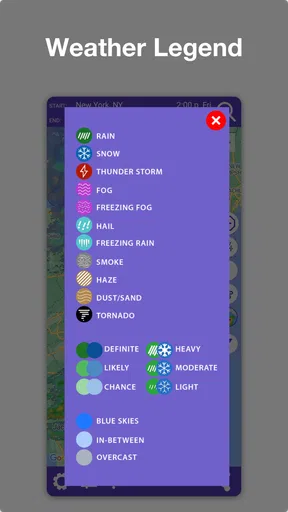
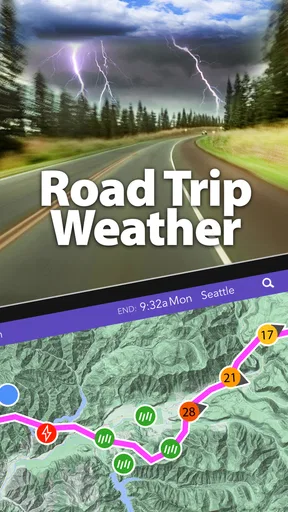
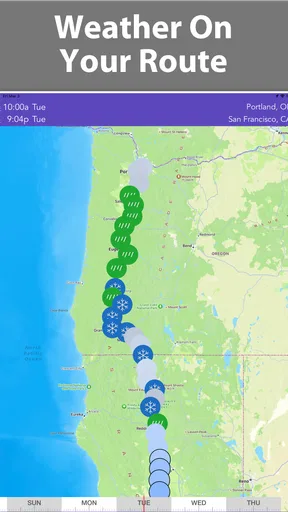
Our Review of Drive Weather With Live Radar
 Analysis by Appyee
For me, the main appeal of Drive Weather is its focus on the journey rather than just the forecast at one location. A regular weather app can tell me what it may be like where I am or where I’m going; this one is built around the changing conditions between those points. That makes it useful when weather could affect when I leave, what I pack, or whether I should rethink a drive. It is a planning aid, not a substitute for safe driving or good judgment, and that distinction matters.
A forecast shaped around the route
As a weather app from Concept Elements Inc, Drive Weather is aimed at drivers who want a route-aware view of conditions, including radar, wind, and snow. The idea is practical: rather than checking several towns one by one, I can think about the trip as a whole and consider how conditions may change along the way. The app has a 4.6 average from around 1.4 thousand ratings, and it has passed 100 thousand installs, which suggests it has found a clear audience among people who travel by road.
The route perspective is most valuable when a trip crosses different kinds of terrain or weather. A sunny departure does not tell me much about the later hours of a long drive, and a destination forecast cannot describe every stretch in between. Seeing conditions in relation to the planned journey helps me ask more useful questions: could rain arrive while I’m on a particular section, would an earlier start change what I encounter, and is it worth checking the plan again before leaving?
Planning before setting off
Have you ever been on a road trip and thought, "I wish I had a better idea of what the weather was going to be like ahead"? Well, the Drive Weather With Live Radar app might just be what you need. This nifty little tool is designed to keep you informed about the weather conditions along your travel route. Let’s dive into what makes this app worth considering for your next journey.
What Is Drive Weather With Live Radar All About?
Picture this: you're planning a road trip, and you want to know if you'll be hitting any storms or if sunshine is going to bless your entire route. The Drive Weather With Live Radar app is crafted exactly for this purpose. By inputting your starting point and destination, you can visualize the weather along your path. This is super helpful, especially if you're driving through areas with unpredictable weather.
Getting Started
First things first, downloading and setting up the app is a breeze. Available on both Android and iOS, it’s just a quick install away from being your new travel buddy. Once you’ve got it up and running, all you need to do is enter your journey details—starting point, destination, and your intended time of travel. The app will then map out the weather along your route in a way that’s easy to digest.
One of the standout features here is how interactive it is. You can slide your finger along the route to see how weather conditions change over time and distance. It’s like having a live weather forecast that moves with you, which I find pretty cool.
Key Features
The app isn’t just about the weather—it’s about making your journey safer and more comfortable. Here are some of the features that caught my attention:
- Live Radar: This feature allows you to see real-time radar images. It’s like having a weather station right in your pocket.
- Time Shifts: You can adjust your departure time to see how the weather may change. This is super handy if you’re flexible with your schedule and want to avoid bad weather.
- Alerts: The app will notify you of severe weather conditions, allowing you to make informed decisions about your travel plans.
How I’d use it for a real trip
Imagine leaving for a weekend drive when the morning forecast looks calm but rain is possible later. I would enter the route and planned departure time at home, then inspect the sections where conditions look less comfortable. If the timing appears awkward, I could compare a different departure time before committing to the drive. That is a more useful workflow than repeatedly checking the weather at my current location and hoping it represents the whole trip.
A practical tip is to treat the route view as a prompt for decisions, not a promise about exactly what you will experience. Forecasts can change, and radar is most useful as a current picture rather than a guarantee of what the road will look like hours later. I’d check the plan before setting out and reassess when safely parked if conditions shift. I would not handle the phone while driving; a weather tool only helps if using it does not create a distraction.
Where it fits beside other weather apps
Compared with a general-purpose weather app, the key difference is the driving context. A standard forecast is often quicker when I only need to know whether to carry an umbrella at home or what the weather is at one destination. Drive Weather makes more sense when the route itself is the question, especially on a longer journey where the forecast at either endpoint leaves important gaps.
It also does not replace a navigation app. I would use navigation for directions and traffic decisions, then use Drive Weather to think through weather along the planned drive. Keeping those jobs separate is a sensible trade-off: this app’s particular value is weather planning, not an all-in-one driving dashboard. If my trip is short and the weather is settled, opening a familiar local forecast may be faster than entering a route.
Using the App on the Road
When you're on the road, the app really shines. With its easy-to-read interface, you’re not distracted from driving, which is a huge plus. It’s clear and concise, giving you exactly the information you need without any unnecessary fluff.
There’s a sense of security knowing that you’re not going to be blindsided by unexpected weather. Whether it’s rain, snow, or just a cloudy day, you’re prepared for whatever Mother Nature throws your way.
Useful for some drivers, unnecessary for others
I can see the strongest case for this app among people who regularly make long drives, road-trip planners, and drivers whose schedules are flexible enough to consider leaving earlier or later. Someone traveling through changing conditions can use the route and time view to decide what deserves a closer look before setting off. It may also help a passenger follow the weather picture while the driver keeps attention on the road.
On the other hand, I would not install it expecting it to make every commute safer automatically. For a brief, familiar drive in ordinary weather, the extra route planning may be more effort than the benefit. Drivers who mainly want a broad local forecast, or who need one app to handle navigation and weather together, may be better served by their usual tools. The best fit is someone who values weather along a journey enough to check it deliberately.
Friendly for Every Traveler
One thing I appreciate is how user-friendly the app is. You don’t have to be a tech whiz to navigate it. The interface is intuitive, which means less time fussing with your phone and more time focusing on the road.
It’s also worth mentioning that the app supports multiple languages, making it accessible to a wider audience. Plus, the design is visually appealing, with clear graphics and a clean layout.
Small trade-offs worth considering
Route-based forecasts are helpful, but they naturally depend on the route and timing I enter. If my plans change, I should revisit the forecast rather than assume the earlier view still applies. That extra step is a fair cost for a more tailored picture, though it makes the app less effortless than glancing at a single local forecast. Likewise, radar and alerts can inform a decision, but they cannot remove uncertainty from changing weather or road conditions.
The app is free to download, with in-app purchases listed from $5.99 to $19.99 per item. I’d start with the free experience and judge whether the route-focused workflow fits my actual trips before paying for anything. It is rated for Everyone, and version 11.4.1 requires Android 7.0 or later. Those details make it approachable for a broad range of users, while the optional purchases are worth keeping in mind if I prefer to avoid spending inside free apps.
Why You Should Consider It
If you frequently find yourself on the road, this app is a game-changer. It’s not just about convenience; it’s about safety. Being able to anticipate weather changes means you can adjust your plans to avoid nasty surprises.
For anyone who loves road trips or has a long commute, the Drive Weather With Live Radar app is like having a co-pilot who’s got one eye on the sky. Whether you’re planning a cross-country adventure or just your daily drive, it’s a tool that adds value to your journey.
In the end, why leave it to chance? With this app, you’re in control, and that’s a pretty great feeling. So, next time you’re hitting the road, consider giving it a try. Safe travels!
My verdict
I’d recommend Drive Weather to drivers who plan journeys where conditions along the way matter more than a simple point forecast. Its route-and-time approach gives me a useful reason to compare plans before leaving, while radar, wind, and snow information keep the focus on driving concerns. It is less compelling for quick local trips, and I would never treat its forecast or alerts as a replacement for attention, updated road information, or common sense.
In short, this is a focused tool rather than a universal weather app. If you often travel far enough for conditions to change between departure and arrival, its planning angle can earn a place on your phone. If your needs are mostly local, a standard weather app is likely enough. That clear distinction is why I find it worth considering, without pretending it is essential for every driver.
Privacy and Permissions
See what permissions an app requests and how it handles your data.
- Location
- approximate location (network-based), precise location (GPS and network-based)
- Photos/Media/Files
- read the contents of your USB storage, modify or delete the contents of your USB storage
- Storage
- read the contents of your USB storage, modify or delete the contents of your USB storage
- Wi-Fi connection information
- view Wi-Fi connections
- Other
- view network connections, pair with Bluetooth devices, access Bluetooth settings, full network access, run at startup, control vibration, prevent device from sleeping, Google Play license check, read Google service configuration
Verdict
Strengths of Drive Weather With Live Radar
- User-friendly interface for easy navigation.
- Accurate weather data with real-time updates.
- Customizable alerts for severe weather.
- Integration with navigation apps for route planning.
- Detailed hourly forecasts for better planning.
Limitations of Drive Weather With Live Radar
- Limited features in the free version.
- Ads can be intrusive during use.
- Requires internet for live updates.
- Some features locked behind a paywall.
- Occasional delays in radar refresh.
Similar Picks in This Category
View All
Weather - By Xiaomi
Xiaomi Inc.4.1

Weather & Radar Forecast
WetterOnline4.8

Weather
OneLouder Apps4.6

AccuWeather: Weather Radar
AccuWeather3.6

The Weather Channel - Radar
The Weather Channel4.6

1Weather Forecasts & Radar
OneLouder Apps4.3
Frequently Asked Questions
What features does Drive Weather With Live Radar offer?
Drive Weather With Live Radar provides users with real-time weather updates along their driving route. The app includes features such as live radar maps, forecasts, and alerts for severe weather conditions. Users can customize notifications for specific weather events and view weather conditions at various points on their journey to better plan their travel.
Is Drive Weather With Live Radar available for both Android and iOS devices?
Yes, Drive Weather With Live Radar is available for download on both Android and iOS platforms. You can easily find the app in the Google Play Store for Android devices and the Apple App Store for iOS devices. Ensure your device meets the app's system requirements for optimal performance.
Does Drive Weather With Live Radar require an internet connection to function?
Drive Weather With Live Radar requires an internet connection to provide updated weather information and radar maps. While some features might be accessible offline, real-time updates and live radar views depend on a stable internet connection. It's advisable to have a reliable data plan or Wi-Fi access during use.
How accurate are the weather forecasts in Drive Weather With Live Radar?
The weather forecasts provided by Drive Weather With Live Radar are sourced from reputable meteorological data providers, ensuring a high degree of accuracy. However, weather conditions can change rapidly, and while the app aims to provide timely updates, users should also remain vigilant and use additional sources for confirmation if needed.
Are there any in-app purchases or subscriptions required for Drive Weather With Live Radar?
Drive Weather With Live Radar offers both free and premium versions. The free version includes basic features, while the premium version may offer advanced features such as ad-free usage, additional customization options, and more detailed forecasts. Users can opt for a subscription or one-time purchase to access premium features.
